Posts

Pre - "Somewhere" Photoshop Post
Image
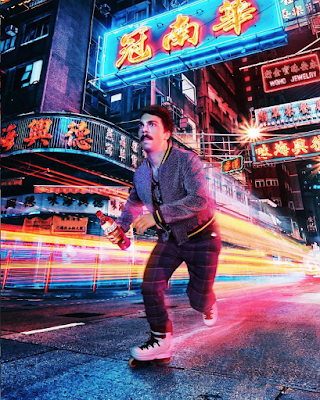
Pre - "Somewhere" Photoshop Post Go to  https://www.instagram.com/kirbyjenner/?hl=en ; find 1 image you think it would be really hard to photoshop yourself in to, post the image and the comment on your blog  I believe this photo above would be hard to create and edit while learning how to use Photoshop.  There are multiple adjustment layers involved in this, as well as, layer effects. _________________ Go to  https://www.instagram.com/averagerob/ ;  find 1 image that inspired you or gave you an idea for the "Somewhere" project. Post the image and the comment on your blog  While brainstorming I was thinking about placing myself in a World Championship Swimming photo or swimming next to my Swimming idol. _________________ Go to  https://www.boredpanda.com/funny-photoshop-troll-james-fridman/  find 1 set of images that made you laugh, post them on your blog with your comment  This ...

Photoshop - Autoscopy

Image
Photoshop ~Autoscopy~ Double Exposure Effect - First Attempt For my Digital Media class, we were asked to create an Autoscopy Portrait of ourselves to learn layer effects and photoshop filters more in debt. I loved this project because it forced me out of my comfort zone while using adjustment layers and multiple settings within photoshop. My inspiration grew from looking at Double Exposure Effect Photoshop pictures. I was eager to try it out and change my hair to either trees or mountains. In my opinion, my first attempt at this kind of artistry turned out great!! While creating this piece, I was inspired by a YouTube video called "Creative Double Exposure Effect - Photoshop Tutorial" by Letsgettoit ( https://www.youtube.com/watch?v=xxtNpFlQ-GQ ). Also, the two pictures below are the pictures that are incorporated into my design above. The portrait of myself was taken in Yellowstone National Park, and the second photo is Mount Rainier in Mount Rainier Nation...

Photoshop - Tag Brush - Cleaned UP

Image
Photoshop ~Tag Brush & Print - Cleaned UP~ Below is my original statement. I wanted to revisit my tag print and clean it up. I started from scratch and created a layout of vibrant colors to display my updated print and then created a single print with three colors combined. I love the results and look forward to creating more tag prints with future designs.  "Below is my tag print. The tag print first started as a logo tag which was turned into a tag brush. I had a lot of fun completing this project because it provided some pizazz to my clean and simple logo. Furthermore, this logo represents my signature, which I can now apply to my present and future work.  This logo can also conveniently switch colors. To create this logo, I first needed to create a B&W' stamp' out of my B&W logo, also known as a tag. My work took place in photoshop. Then I turned the B&W logo into the page of fluorescent colors, which is something I had a lo...

Photoshop - B&W to Color Photo

Image
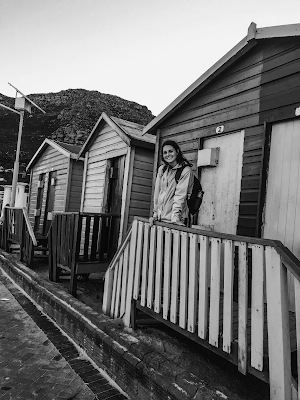
Photoshop ~B&W Photo to Color Photo~ For this project, I chose to use a picture of me standing on the Beach Huts at Muizenberg Beach, Cape Town, South Africa. This photo is perfect because the original one displays a vibrancy of colors as well. I would describe them as lego colors - yellow, red, green and blue. Fun fact: Muizenburg Beach is known for its surfing community. Also, home of many great white sharks. When I was there back in the summer of 2017, I remember walking around and there being giant wooden signs asking the public to beware of the great whites. This is my first Black and White to Color Portrait of the three that are shown below. This is the first time I have transformed a black and white photo into a vibrant, revived photo. For this particular version, I chose to use the Analogous palette. I really enjoyed this project because of the challenge that was presented by being forced to only use colors from the palette. Making the phot...

Photoshop - Tag Brush

Image
Photoshop ~Tag Brush~   (This is the 2nd design that is discussed below) Below is my tag print. The tag print first started as a logo tag which was turned into a tag brush. I had a lot of fun completing this project because it provided some pizazz to my clean and simple logo. Furthermore, this logo represents my signature, which I can now apply to my present and future work.  This logo can also conveniently switch colors. To create this logo, I first needed to create a B&W' stamp' out of my B&W logo, also known as a tag. My work took place in photoshop. Then I turned the B&W logo into the page of fluorescent colors, which is something I had a lot of fun doing. Lastly, I love the color blue and ended up creating a second design. I overlapped a mint blue, sky blue, and deep green/blue.

PHOTOSHOP Tutorials- My Top 3 Favorites

PHOTOSHOP Tutorials ~My Top 3 Favorites~ First off, I love photography and have been learning and practicing photoshop. The creativity that it has to offer is endless. Here are a few links to tutorials I found very helpful. I look forward to being able to master these skills during my digital media class, as well as, through my hobby, photography. How to Creatively Blend Two Images in Photoshop | Photoshop Tutorial https://www.youtube.com/watch?v=ErDuKDNhYsI Remove Fence with 3 Simple Steps in Photoshop! youtube.com/watch?v=yBCj8Kg9lZg How to REMOVE PEOPLE from your photos EASILY! https://www.youtube.com/watch?v=OXj79mvyf5Y Thank you!!

Illustrator CC - Gradient Mesh - Mickey Mouse

Image
Illustrator CC  ~Gradient Mesh~  As you can see below, I created a gradient mesh in Illustrator of Mickey Mouse. I was inspired to develop mickey because I currently live in Florida, and growing up, I would go to Disney World every spring break. It was something I looked forward to as a young child every year. Also, within the program Illustrator CC, I needed to practice using the pen tool. He was perfect for this because of his simple character design. After completing this project using the pen tool and incorporating gradient mesh, I have realized this is how artist make their artwork come to life. As a new artist in Illustrator, I loved completing this project because it allowed me to see simple posters, banners, and online artwork from a new perspective. It’s impressive, and I admire the artwork that much more. Even though it most likely doesn’t take a professional illustrator user much time in comparison to me, it motivates me to spend more time masteri...